
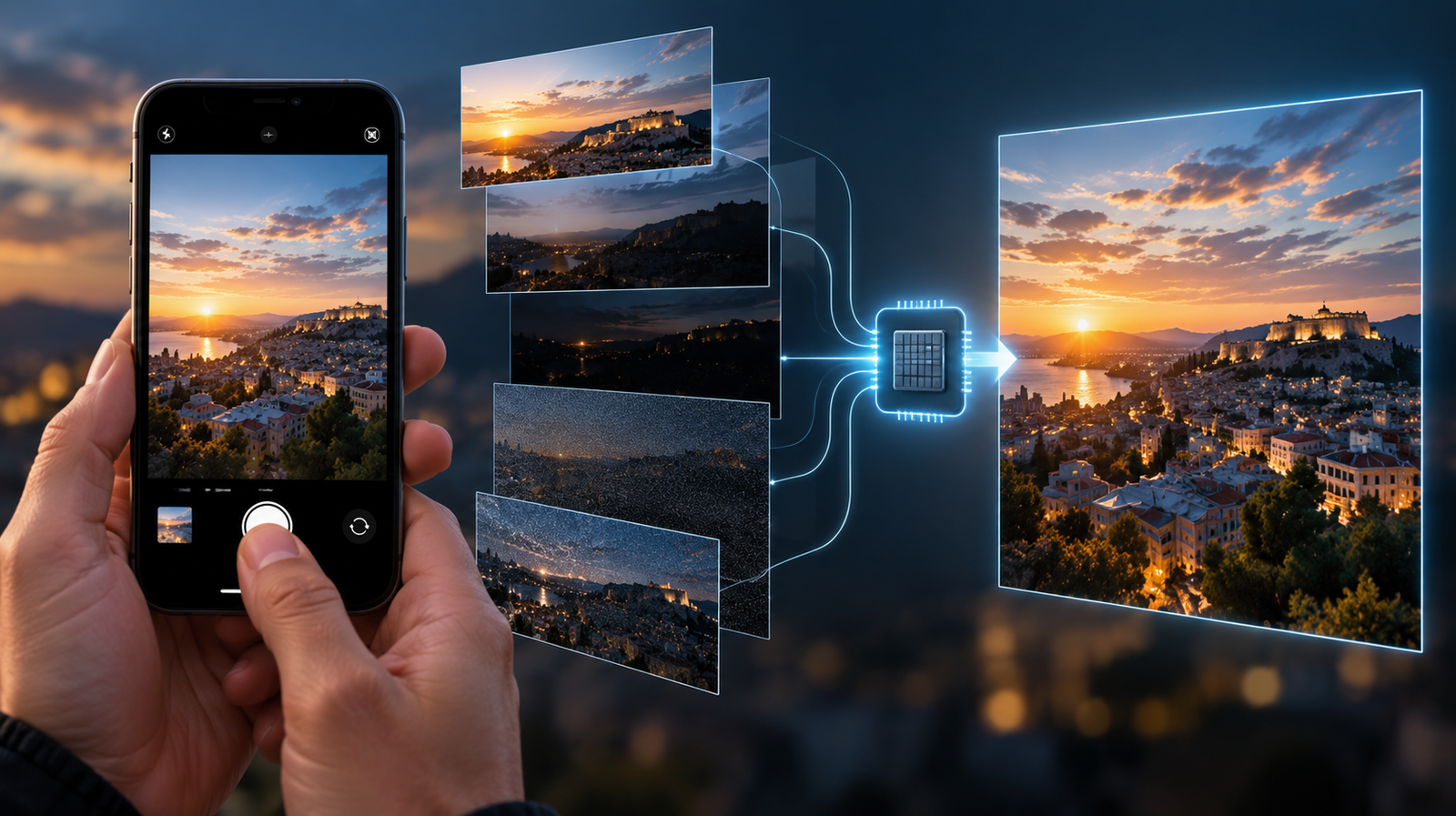
You press the shutter button once and a single photo appears in your gallery. But your Smartphone Takes Several Photos before creating that final image.
Modern smartphone photography relies increasingly on computational photography, combining information from multiple frames instead of depending on a single conventional exposure. Some frames can help preserve highlights, others capture information from darker areas, while additional data can reduce noise, improve detail and compensate for movement.
All of this happens within seconds, often without the user noticing. The result is simple: you press the shutter once, but the final photograph may combine information captured across several moments.
Techrow.gr examines why a smartphone takes several photos, how HDR and image stacking work, what happens when subjects move and why modern camera quality increasingly depends on how multiple captures are combined.
One Tap Does Not Always Mean One Frame
Traditional photography makes the idea of a photograph relatively intuitive. Light reaches the sensor or film during an exposure and that exposure produces the image.
Smartphone photography can be more complicated.
When you press the shutter, the phone may have access to multiple frames captured around that moment. Depending on the camera system and shooting conditions, software can analyze and combine information from several of them before producing the photograph that appears in the gallery.
The important distinction is that these frames are not necessarily saved as separate photographs for the user. They can function as ingredients used internally by the imaging pipeline.
What appears to be one photo can therefore be the result of multiple captures and considerable computation.
Why Smartphones Need Multiple Frames
Smartphone cameras face a physical limitation: they have to fit inside extremely thin devices.
Although mobile camera hardware has improved enormously, smartphones cannot simply scale their optics and sensors without affecting device size, camera-bump dimensions and other engineering constraints.
Computational photography provides another route.
Instead of expecting one exposure to contain everything needed for the final result, the phone can gather more information across several frames and use software to combine the useful parts.
This can help with several common photographic challenges, including dynamic range, low-light noise and detail.
In other words, rather than making the camera infinitely larger, manufacturers can make the imaging process more computationally sophisticated.
HDR Is a Familiar Example
High Dynamic Range photography is one of the clearest examples of why multiple exposures can be useful.
Imagine photographing someone standing in front of a bright sky. A single exposure may struggle to preserve both the bright clouds and the darker face. Expose for the sky and the person may become too dark. Expose for the person and highlights in the sky may be lost.
Multi-frame HDR can provide the imaging system with additional information across different exposures or frames.
The software can then attempt to preserve useful information from bright and dark parts of the scene, creating a final image with a wider apparent dynamic range.
What matters is that the user does not necessarily have to manually capture several photographs and merge them later.
The phone can perform much of the process automatically.
The Camera May Start Before You Press the Button
One of the most interesting aspects of smartphone photography is that the camera does not necessarily begin understanding the scene only after the shutter is pressed.
While the camera preview is active, the device is already receiving a continuous stream of image data. Depending on the implementation, frames from around the shutter event can be available to the computational pipeline.
This helps explain how smartphones can make capture feel nearly instantaneous while still performing sophisticated processing.
The shutter button increasingly acts less like a mechanical instruction saying “begin creating an image now” and more like a signal telling the system “this is the moment I want you to produce a photograph from.”
That is a subtle but important change in what taking a picture means.
Image Stacking Can Reduce Noise
Multiple frames are particularly valuable when light becomes scarce.
Low-light images contain more visible noise because the camera has less light available to work with. One possible response is to use longer exposure times, but that increases the risk of blur when either the camera or subject moves.
Another approach is to combine information from multiple frames.
If the imaging system can align them accurately, consistent scene information can be reinforced while some random noise can be reduced.
The principle is powerful because the phone can use time and computation as additional photographic resources.
Instead of depending entirely on one exposure, it can gather information repeatedly and use software to determine what is consistent across those captures.
Night Mode Takes This Further
Night modes make this approach especially visible.
When photographing a dark scene, a smartphone may spend noticeably longer gathering information. The interface might even ask the user to hold the device still for a moment.
During that period, the camera can collect multiple frames and combine information from them to create a brighter and cleaner final result than a straightforward short exposure might produce.
But this introduces a challenge.
The world does not stop moving while the phone is collecting those frames.
People move. Cars pass. Leaves move in the wind. Hands shake.
The camera therefore cannot simply place every frame on top of every other frame and assume they match perfectly.
Frames Must Be Aligned
Before multiple frames can be combined effectively, the smartphone needs to account for differences between them.
Even when the user believes the phone is perfectly still, tiny hand movements can change the position of objects within the frame. Optical and electronic stabilization can help during capture, while computational alignment can help the software determine how the images correspond.
This is one reason multi-frame photography requires substantial processing.
The system needs to determine what belongs where before deciding what information should contribute to the final image.
If alignment fails, the result can include softness, strange edges or other artifacts.
Successful computational photography therefore depends not simply on capturing more, but on combining those captures intelligently.
Moving Subjects Make Everything Harder
A static building is relatively cooperative.
A running child is not.
If a person moves between frames, their position changes. Combining those frames without accounting for the movement can produce ghosting or other unnatural results.
Modern camera pipelines therefore need ways to detect motion and decide how different regions of the image should be treated.
The best information for the sky may come from one frame while the best representation of a moving face may come from another.
This illustrates why computational photography is more complex than simply averaging several photographs together.
The software is increasingly making local decisions about different parts of the image.
The “Best” Frame Can Matter
Not every frame captured around the shutter event is equally useful.
One may contain less motion blur. Another may capture a better facial expression. Another may preserve highlights more effectively.
Depending on the implementation, the imaging pipeline can evaluate available information and select or prioritize frames that are more useful for producing the final photograph.
This is especially important because smartphone users expect the camera to work quickly.
Most people do not want to manually review a sequence of raw captures every time they photograph something.
They expect the phone to make many of those decisions automatically.
Computational Photography Changes What a Photo Is
This leads to a larger conceptual change.
A photograph was traditionally associated closely with a particular exposure.
With computational photography, the final image can increasingly be understood as a constructed result derived from captured visual data.
That does not mean the image is necessarily artificial or disconnected from reality. It means that the path between photons reaching the camera and pixels appearing in the gallery contains more decisions than it once did.
Exposure selection, alignment, HDR processing, noise reduction, sharpening, color processing and frame fusion can all contribute to the result.
The smartphone camera does not merely record.
It interprets.
More Frames Do Not Automatically Mean Better Photos
If multiple frames provide more information, it might seem logical that using more frames would always improve image quality.
It is not that simple.
More frames also mean more data to process and potentially more opportunities for movement between captures. Processing needs time and energy, while aggressive merging can create unnatural textures or artifacts if the algorithms make poor decisions.
Manufacturers therefore have to balance image quality, processing speed, battery consumption, motion handling and the responsiveness users expect from a smartphone camera.
The objective is not to capture the largest possible number of frames.
It is to capture enough useful information to produce a better final result.
Processing Speed Matters
Multi-frame photography would be far less practical if users had to wait several seconds after every ordinary photograph.
Modern smartphones therefore depend heavily on fast image processing.
The ISP, CPU, GPU and increasingly specialized computational hardware can participate in different parts of the imaging pipeline, depending on the device architecture.
Faster processing allows camera systems to analyze more visual information while keeping the experience responsive.
This helps explain why camera improvements do not always require a completely new sensor. Changes in processing hardware and software can expand what manufacturers are able to do with the information the camera already captures.
The Sensor Still Matters
Computational photography does not make camera hardware irrelevant.
Software cannot recover unlimited information that was never captured in the first place. Sensor size, lens quality, aperture, autofocus, stabilization and other hardware characteristics still influence the quality and quantity of information available to the system.
The relationship is therefore complementary.
Hardware determines what the camera can capture. Computational photography determines what the system can do with those captures.
This is also why two smartphones can use apparently similar camera hardware and still produce noticeably different photographs. The final result depends on the entire imaging pipeline rather than one specification alone.
One Shutter Press Can Hide Enormous Complexity
This complexity is deliberately hidden from the user.
Most people do not want to choose how many frames should be captured, which exposure should become the reference frame or how aggressively noise should be reduced every time they take a photograph.
They want to press a button.
The smartphone abstracts the technical process into a simple interface.
That simplicity is one of computational photography’s greatest achievements. A process involving sensors, stabilization, frame buffers, image alignment and computational processing can be reduced to a single familiar action.
Tap.
The complexity remains, but it moves behind the interface.
Easier Capture Changed How We Use Photography
That almost frictionless experience has consequences beyond camera technology.
When taking a photograph requires little more than pulling a phone from a pocket and tapping the screen, photography becomes easier to integrate into everyday behavior. Images no longer need to represent major memories; they can become temporary notes, reminders, messages and records.
Athens Pulse explores this behavioral shift in “Why do we take so many photos we never look at again?”, examining why smartphone users accumulate thousands of photographs and screenshots even when many may never be revisited.
The technological simplicity of capture is part of what made that behavior possible. The easier the camera becomes to use, the lower the threshold for deciding that something is worth photographing.
The Camera Roll Became Part of Consumer Behavior
The same low-friction photography also appears inside purchasing decisions.
Consumers photograph products in stores, save screenshots, capture price labels and send images to friends while comparing alternatives. In those situations, photography is not primarily about preserving a memory. It is being used as a practical decision-making tool.
Targeted.gr examines this in “The Camera Roll Is the New Customer Diary: What Everyday Photos Reveal About Consumer Behavior” exploring how photographs and screenshots can become private steps inside consideration, comparison and purchase journeys.
Again, the technology itself can disappear from the user’s perspective. Nobody needs to understand frame stacking to photograph a price tag. But the sophistication happening underneath helps make the camera reliable enough to become an everyday utility.
More Capture Has Its Own Economics
There is also an economic dimension to this technological transformation.
Film photography imposed a direct cost on additional exposures. Smartphone photography largely removes that immediate per-photo cost from the user’s experience, making repeated capture far easier to justify.
Market Insiders explores this shift in “The Economics of Unlimited Photography: What Changes When Taking One More Photo Costs Almost Nothing?”, examining how near-zero marginal capture cost moves scarcity away from production and toward storage, organization, retrieval and attention.
Computational photography adds an interesting second layer to that argument. Not only can users take more photographs at little perceived incremental cost, but the device itself can process multiple frames behind each final image without asking the user to think about the additional captures.
Digital abundance exists both in front of and behind the shutter button.
Why RAW Can Look So Different
This also helps explain why a RAW image can sometimes look surprisingly different from the processed photograph produced by the default camera app.
A conventional RAW file generally preserves much less of the manufacturer’s finished computational interpretation than the final JPEG or HEIF image.
The processed photograph may include extensive tone mapping, noise reduction, sharpening, color adjustments and other computational decisions.
However, modern smartphone RAW implementations can vary, and some computational RAW formats may themselves incorporate multi-frame processing. So “RAW” should not automatically be interpreted as a completely untouched single sensor exposure.
The broader point remains: the image shown immediately in the gallery can represent considerably more processing than its simple appearance suggests.
Video Uses Similar Ideas Differently
Many of the computational challenges involved in still photography also appear in video, although the requirements are different.
Video must process a continuous sequence while maintaining frame rate and temporal consistency. HDR, stabilization, noise reduction and computational enhancement therefore have to operate repeatedly and quickly.
Still photography has more freedom to devote processing to one final image.
This helps explain why a smartphone can sometimes produce an impressive low-light still photograph while video captured in the same environment remains much more challenging.
A still image can combine information across time in ways that are harder to hide when the output itself must show continuous motion.
Why Camera Comparisons Are Getting Harder
Computational photography also complicates smartphone camera comparisons.
A specification sheet can tell us which sensor a phone uses, the aperture of a lens or the nominal resolution of the camera. It cannot fully describe how the device behaves when the shutter is pressed.
How many frames are involved?
How aggressively does the system use HDR?
How does it handle moving subjects?
How much noise reduction is applied?
How does the processing change between daylight and night?
These questions increasingly matter because the software pipeline can influence the final image as much as some easily advertised hardware specifications.
The camera is becoming less like an isolated component and more like an integrated hardware-software imaging system.
The Shutter Button Has Changed
The shutter icon on a smartphone still resembles the logic of traditional cameras.
Press it and take a photograph.
But technologically, its meaning has changed.
The button may not simply tell the camera to expose one frame. It can mark the point around which a computational system gathers, evaluates and combines visual information.
The final photograph can therefore represent more than one instant in the strict traditional sense.
It is still your photograph of that moment.
But the phone may have used several fragments of time to build it.
One Photo, Many Decisions
The most impressive part of modern smartphone photography may not be that phones can capture several frames.
It is that users usually do not need to know that they do.
We press the shutter once.
Behind that single action, the camera system can evaluate exposure, movement, dynamic range, noise and detail before deciding how available information should contribute to the final image.
The photograph appears.
The intermediate frames disappear from view.
And an enormously complicated imaging pipeline becomes something that feels almost instantaneous.
So the next time you press the shutter button once, remember that “one photograph” describes what appears in your gallery — not necessarily everything your smartphone had to capture to create it.
Frequently Asked Questions
Does a smartphone really take multiple photos when I press the shutter once?
It can use information from multiple frames, depending on the device, camera mode and shooting conditions. Those frames do not necessarily appear as separate photographs in the gallery.
Why do smartphone cameras use multiple frames?
Multiple frames can provide additional information for HDR, noise reduction, low-light photography, detail enhancement and other computational photography techniques.
What is multi-frame photography?
Multi-frame photography uses information from more than one captured frame to help create a final image rather than relying entirely on a single exposure.
What is image stacking?
Image stacking is the process of combining information from multiple images or frames. In smartphones, it can be used for purposes such as noise reduction, HDR and low-light processing.
Does HDR use several photos?
HDR techniques can use information from multiple exposures or frames to preserve a wider range of brightness information than might be possible from a straightforward single exposure.
Why do I need to hold my phone still during Night Mode?
Night modes may gather information over a longer period and across multiple frames. Excessive camera movement can make alignment and image fusion more difficult.
Can moving people cause problems with multi-frame photography?
Yes. If a subject changes position between frames, the software needs to account for that movement. Otherwise, artifacts such as ghosting can occur.
Is computational photography more important than the camera sensor?
They perform different roles. The sensor and optics determine what visual information can be captured, while computational processing determines how that information can be combined and transformed into the final image.
Does RAW disable computational photography?
Not necessarily. Smartphone RAW implementations vary, and some computational RAW formats can incorporate processing or information from multiple frames.
Why can smartphone photos look better immediately than RAW files?
The default camera app may apply HDR, tone mapping, noise reduction, sharpening, color processing and other computational techniques automatically, while RAW files are intended to preserve greater editing flexibility.